Designing for 2026: Emerging UX/UI Trends That Turn Clicks Into Customers
( Share On )
22 min read



Just think about the last time you bailed on a site because it felt clunky, confusing, or kinda stuck in 2018—your users do the same thing, only faster. In 2026, UX/UI isn’t just about clean visuals or trendy components. It’s a performance lever that can quietly boost—or wreck—your conversions depending on how well your interface guides behavior, builds trust, and removes friction.
The expectation level has jumped. Users now assume your product will be mobile-native, accessible, fast, and helpful by default. AI is no longer a novelty add-on; it’s becoming a behind-the-scenes co-pilot that can personalize flows, shorten decision paths, and make interfaces feel smarter without turning them into unpredictable “feature soup.”
In this guide, you’ll walk through 11 UX/UI trends that actually move metrics—AI-powered assistance, dynamic personalization, UX writing that sounds human, micro-commitment flows, bento-style layouts replacing dead carousels, UGC-driven trust signals, and leaner design that improves speed (and even reduces digital footprint). Not trends for portfolios—trends for revenue.
Just think about the last time you bailed on a site because it felt clunky, confusing, or stuck in 2018 – your users do the same thing, only faster. In 2026, your UX/UI decisions can quietly boost or wreck up to half of your conversions, which means you can’t just chase pretty visuals, you’ve got to align design with behavior, trust, and real business goals. In this guide, you’ll walk through practical trends that actually impact revenue, not just portfolios.
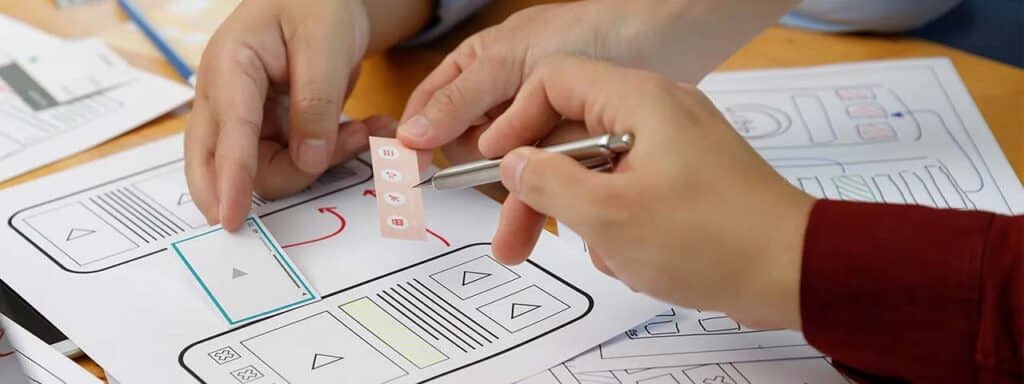
Key UX/UI design trends for 2026 center on intelligent, adaptive, and empathetic experiences driven by AI, moving beyond simple personalization to hyper-contextual, emotionally aware interfaces. Expect multimodal interactions (voice, gesture, text), deeper spatial/AR integration, emphasis on ethical design & digital well-being, functional minimalism with rich micro-interactions, and seamless ecosystem experiences across devices, with accessibility as a core.
UX Trends
UX Design Elements
Designer Focus

You’re not replacing designers with AI; you’re replacing tedious, repetitive work. In 2026, you use AI to auto-generate layouts, prioritize content based on user intent, and even predict drop-off points before they tank your conversion rate. Tools like Figma’s AI features or Framer’s smart components let you test 3-5 variants in hours, not weeks, while keeping your brand-safe guardrails intact so the interface still feels familiar to your users.
Instead of staring at a blank artboard, you start with AI-generated wireframes, then spend your time refining flows and microcopy. You feed it analytics, session recordings, and heatmaps so it can suggest data-backed improvements like cutting fields, adjusting the hierarchy, or simplifying steps. This doesn’t just speed you up – teams report 20-30% shorter cycles on A/B tests because AI handles the grunt work of variants while you focus on the actual UX decisions.
Rather than showing everyone the same screen, you let AI quietly tweak the UI based on behavior: surfacing a faster checkout for repeat buyers, or adding guided filters for confused first-timers. You’ve seen this in action on Amazon-style product feeds that re-rank cards in real time or SaaS dashboards that highlight the 2-3 metrics a user actually checks. The cool part is that the interface still looks “normal” – it just feels oddly more helpful and less tiring.
Think about a banking app that notices you always split bills and starts pre-suggesting contacts, amounts, and even payment notes – that’s a smart interface quietly reducing friction. Or a B2B dashboard that hides noisy metrics and pushes a single “next best action” based on your current funnel stage. You’re basically training the UI like a product teammate: you define rules, limits, and non-negotiable safety rails, then let AI adapt sequence, priority, and hints in real time. Over a few weeks, you’ll often see fewer support tickets, shorter task completion times, and a bump in NPS without a flashy redesign, just by letting the interface act a bit more like a thinking assistant instead of a static board.

You’ve probably noticed how fast users bounce when a page feels generic – that’s why personalized UX can lift conversions by 10-30% across e-commerce, SaaS, and even banking. Instead of generic blocks, you tailor layouts, offers, and CTAs to behavior, not guesses. If you want a deeper breakdown of what’s shaping this shift, check out Top UX Design Trends to Follow in 2026 and Beyond and map it against your own product flows.
On most analytics dashboards, you’ll see the same pattern: 20% of users generate 60-80% of revenue, yet they still get the same homepage as first-time visitors. Instead of one funnel, you create multiple entry points – different hero blocks, navigation priorities, and micro-copy for new, returning, and high-intent users. That way, your UI stops acting like a brochure and starts acting like a smart salesperson who actually listens.
Think about your last visit to Netflix or Spotify – you didn’t browse everything; you followed what felt “just for you”. That’s the bar now: recommendations, content blocks, and flows that adapt on the fly to intent, not just segment tags. You use browsing history, clicked filters, and abandoned steps to tweak not only what you show, but when and in what order you show it.
In practice, you might surface a 3-step configurator only for users who bounced from a long product list, or shorten checkout for returning buyers who always pay with the same method. You can hide advanced filters for first-time visitors, then reveal them once they’ve interacted with basic options at least 2-3 times.
You adjust the tone, too: softer, supportive microcopy for complex forms, and more direct CTAs when behavior signals high purchase intent. Over time, those small tailoring moves compound into a very real uplift in metrics – higher task completion, fewer support tickets, and a UX that quietly feels like it “gets” your users without making a big show of it.

Studies from Nielsen Norman show that users decide whether to trust a page in 50 milliseconds – way before they read your whole layout. But they do notice if your copy sounds robotic, confusing, or salesy. When your microcopy clearly explains risks, prices, and next steps, support tickets drop and completion rates grow. So if your UI looks premium but your wording feels sloppy, you’re quietly leaking conversions and user loyalty every single day.
Apps that adopt a consistent, recognizable tone of voice see up to 23% higher user retention, according to multiple SaaS benchmarks. You feel this when a fintech app talks to you like a calm expert, not a call center script. Strong UX writing trims fluff, states outcomes upfront, and uses the same words for the same actions across the whole flow. In practice, that can be as simple as ditching jargon and saying “Get your refund” instead of “Submit reimbursement request.”
Brands that write like real humans, not corporate templates, often see 30-40% higher email and in-app message engagement. You don’t need jokes in every line – you need clarity, empathy, and small signals that you actually get what users are going through. That might be a short line before a long form that says, “Takes about 2 minutes, we timed it,” or a failure message that admits, “That’s on us, not you.” Tiny, honest phrases like this quietly build long-term trust.
One of the easiest ways to make your copy feel authentic is to mirror the words your users already use in reviews, chats, or support tickets – we do this in UX projects constantly, and it almost always lifts task success and satisfaction scores. Instead of calling it a “personal dashboard,” you might switch to “your workspace” if that’s what people naturally say. And when things break, your error copy should own the problem: “We couldn’t save your changes” plus a straightforward fix, not a cryptic code. Every message either proves you’re on the user’s side or quietly signals you’re hiding something, so your job is to let real-life language, not legalese, lead the interface.
People often think micro-commitments are just fancy pop-ups, but your real advantage is how they quietly remove friction from high-stakes decisions. When you break a big ask into tiny taps, choices, or swipes, you keep users in motion instead of forcing them into all-or-nothing mode. In our projects, simple 3-step helpers on checkout or onboarding boosted completion rates by 25-40%, without extra discounts or aggressive copy – just cleaner, smaller steps that feel safe enough to try.
Most teams obsess over the final CTA, but your real leverage is the first 3 seconds: a low-pressure click, a single choice, one tiny answer. Micro-flows like “choose your goal”, “pick your level”, or “select 1-2 issues” consistently deliver 2-3x more completions than forms that dump everything on the user at once. You’re basically trading one scary wall of fields for a guided path that feels more like a chat than a task.
Quizzes aren’t about entertainment; they’re about clarifying choice and capturing intent in under 60 seconds. When you cap questions at 5-7, show progress, and give a genuinely helpful result at the end (not just “give us your email”), you turn bounces into leads. In our tests, product finders with 3-5 clear questions lifted add-to-cart rates by 30-45%, simply because users felt like the site finally “got” what they were trying to do.
A practical way to nail this is to start from your catalog chaos, not from the quiz idea itself: where are users freezing, scrolling back and forth, or rage-clicking filters, and how could a 5-question flow shortcut that pain. You might ask about budget, use case, experience level, or constraints (pets, allergies, deadlines) and map each answer to 2-4 tight recommendations, not a flood of SKUs. Because the result must feel like a smart friend’s tip, add 1-2 lines of why each pick fits their answers, then slide in a clear, single CTA like “Add to cart” or “Book this plan” so users don’t have to think twice about the next move.

You feel this shift most on homepages and key category screens, where bento grids instantly show 3-6 core offers without forcing you to swipe or guess. Instead of hoping users notice slide 4 of your carousel, you surface multiple priorities at once: promo, social proof, quiz, and new arrivals. Brands that tested multi-banner layouts against classic sliders often see +20-30% more clicks on secondary content, because users actually see it.
You already know how it goes with carousels: first slide works, the rest are basically dead weight. On mobile, things get even worse – users rarely swipe more than once. By replacing a 5-slide carousel with 4-5 visible tiles, you stop hiding important content behind tiny dots and swipes. You also get cleaner analytics because you can clearly see which tile drives traffic, not just which slide someone happened to land on.
You get a layout that feels modern and almost “app-like”, while still staying simple to build and test. A bento grid lets you combine different card sizes, priorities, and content types in one view: a hero offer, a limited deal, a UGC block, and a quiz card, all working together. For ecommerce, that usually means more product discovery and up to 15-25% higher engagement with mid-page content.
What really changes with a bento grid is how you tell a story above the fold. Instead of one giant banner screaming a single message, you create a mini dashboard of your ecosystem: loyalty perks, sales, category shortcuts, maybe even a “new this week” tile tied to your stock feed. You can A/B-test card order, size, and visuals quickly, then freeze the high performers.
And because everything is visible at once, you reduce pogo-sticking, help users self-segment faster, and give your merch or marketing team way more flexibility without wrecking your layout every time they run a new campaign.

When you scroll Nike’s homepage and see headlines literally slicing through product shots, you instantly get how text-image fusion works in 2026. You’re not just decorating the hero, you’re building a story that’s read and seen at the same time. The trick is to keep contrast, hierarchy, and accessibility under control, because once your CTR drops by 15-20% due to unreadable headlines, that artsy overlap stops feeling so smart.
A travel brand we worked with swapped a static banner for a hero where the tagline moves with the scrolling landscape photo, and bookings jumped by 27% in 3 weeks. You can do the same by letting copy react to imagery: change the headline when the product variant changes, sync motion with scroll, or reveal benefits as users hover specific zones. Minor tweaks, but they make your hero feel like a scene, not just a billboard.
On high-performing sites, you’ll rarely see text randomly slapped over photos, because composition is doing the heavy lifting for readability and focus. You’re balancing three things at once: where the eye lands first, what’s legible in 1 second, and how the layout scales across breakpoints. When you get that triangle right, your hero stops being “pretty” and starts actively pushing users toward the following action.
Think about how Apple product pages handle this: the headline sits in the calmest part of the photo, there’s generous negative space, and contrast is rarely below WCAG AA – that’s not an accident, it’s composition math. You should test overlays on grayscale versions of your hero, check whether users can read the main message in under 800 ms, and use grids so faces, key objects, and text don’t fight for attention. In practice, that might mean darkening a part of the image, shifting the subject slightly off-center, or cropping more aggressively than feels “safe” so your CTA has a clear visual runway.
If there’s one theme that defines UX/UI in 2026, it’s this: the best interfaces feel like they’re paying attention. They guide without nagging, personalize without creeping people out, and use AI to reduce effort—not to add noise. The winners won’t be the teams with the flashiest visuals; they’ll be the teams who build calmer, clearer, faster paths to “yes.”
Ultimately, you’re not just scrolling through trend lists for fun; you’re trying to figure out what will actually keep your product relevant in 2026 and beyond. If you focus on AI that genuinely helps, interfaces that adapt to your users, clear UX writing, trust-building UGC, and ethical, lightweight design, you’re already ahead of a good chunk of the market.
Treat these trends like a toolkit, not a checklist. You don’t need all 11 at once—most teams fail by stacking “modern” features on top of a shaky foundation. Start with fundamentals (speed, clarity, accessibility, trust), then layer in smarter patterns like dynamic layouts, micro-commitment flows, and UGC-driven credibility that actually support decision-making.
Want a shortcut to what will matter most for your product? Studio Five specializes in UX/UI design for modern brands—especially teams navigating AI-driven experiences, multilingual audiences, and conversion-focused redesigns. Reach out, and we’ll help you turn these 2026 trends into measurable growth.
Q: What makes UX/UI design trends in 2026 different from previous years?
A: A few years ago, teams would redesign a homepage, polish the visuals, and call it a day, then conversions barely moved. In 2026, the shift is much more about behavior, context, and how fast a user can get from “what is this?” to “ok, I trust this, and I know what to click next.”
The big difference is that trends now sit directly on business metrics. AI-driven assistance, dynamic layouts, micro-commitments, and thoughtful UX writing are all measured against complex metrics like conversion rate, AOV, and retention, not just Dribbble likes. It’s convenient.
You’ll see fewer flashy, one-off effects and more systems: adaptive interfaces that reconfigure based on user intent, content that adjusts to where a person is in the journey, and visual languages that scale across products. So the “trend” is that design is finally treated as a testable growth lever, not a one-time facelift.
Q: How should designers actually use AI in UX/UI without ruining the experience?
A: Picture a travel app where, instead of dumping every filter and offer on the screen, the interface quietly suggests the best route, hotel, and check-in options based on your last 3 trips. It feels like a smart assistant, not a bossy robot taking over your screen.
In 2026, AI in UX/UI works best as a layer on top of classic, familiar patterns. It helps users search, fill forms, compare options, and make decisions faster, but the visual structure stays predictable. Think conversational helpers, smart presets, pre-filled data, and subtle hints that cut down steps, not wild experimental layouts that confuse people.
The safest rule: AI should guide, not perform magic tricks. If users don’t understand what the system did or why, trust drops immediately. Explain changes, keep controls visible, let people override suggestions, and keep AI-generated content within clear guardrails so it supports your brand voice and doesn’t turn the interface into a generic chatbot screen.
Q: What do “dynamic, personalized interfaces” really look like in practice?
A: Imagine you open a marketplace for the fifth time, and it quietly skips the generic homepage: no giant hero banner screaming “New collection” again, just a set of tailored blocks with the category you usually buy from, your price range, and a quick “repeat last order” tile. Feels like the site finally knows you, right?
That’s what dynamic interfaces in 2026 are doing. Instead of one fixed template for everyone, the system rearranges modules based on past behavior, segment, location, device, and even time of day. Filters surface automatically, specific CTAs change (“finish setup” vs “upgrade now”), and the page block hierarchy shifts in real time.
The trick is to keep the UI skeleton the same while letting the content, order, and microcopy adapt. You don’t want users to feel lost each session. Let the navigation, basic grid, and key components stay constant, and use personalization in the parts that genuinely speed decisions: recommendations, shortcuts, onboarding steps, and key actions.
Q: How can UX writing build trust when AI-generated copy is everywhere in 2026?
A: Think about the last time you hit a vague error message like “Something went wrong” and just bailed. Now compare it to a checkout that tells you, “The bank declined your card. Try a different card or contact your bank support.” Same problem, totally different level of confidence.
In 2026, UX writing that works feels short, clear, and a bit human, not robotic or over-polished. Microcopy explains what’s happening in plain language, anticipates the user’s emotional state (frustrated, hesitant, confused), and offers one obvious next step. It doesn’t try to be poetic; it tries to be useful.
Practical steps: cut fluff from CTAs, name actions for what they do (“Start free audit” instead of “Submit”), add small bits of light, brand-appropriate humor in low-risk spots, and be ultra-specific where anxiety is high (payments, data, privacy). And if your team uses AI to draft text, always run it through a human edit to keep the voice consistent and the content from feeling mass-produced.
Q: Do micro-commitment tools like quizzes and product finders really move the needle?
A: Picture a user landing on a giant catalog of 800 products. Most people scroll a bit, then bounce. Then that same user hits a short flow starting with “What are you shopping for today?” followed by 3 lightweight questions and ends with a tight list of 10 tailored picks. That point already invests them.
That tiny first step is what changes behavior. When you start with one easy tap or choice – pick a goal, choose a budget, say where you’re stuck – people are far more likely to keep going until they reach the final CTA. Funnels with interactive quizzes, calculators, or checklists regularly outperform plain static pages in both engagement and conversions.
To make it work, keep the early questions genuinely easy, show visible progress, and close with a recommendation that feels like a natural outcome of the mini-conversation, not a random promo. And don’t bury the CTA after the quiz – pair the result with 1-2 simple actions like “Add to cart”, “Book a call”, or “Get detailed report”.
Q: Are visual trends like glassmorphism, multi-banners, and text-over-image heroes actually good for usability?
A: You’ve probably opened a site where the glassy panels looked cool in the first second, then you couldn’t read half the text over the background image. So yes, these styles can backfire pretty fast if they’re applied purely for aesthetics.
Glassmorphism in 2026 works when it supports hierarchy: blurred backgrounds that separate key cards from noisy visuals, soft depth that draws the eye to main actions, and transparent layers that maintain strong contrast. The goal is to highlight, not decorate. Always test readability on low-quality screens, not just your designer monitor.
Multi-banner “bento” grids and text integrated into hero imagery are mostly about scanning speed. You want several distinct entry points visible at once, not one lonely slider that no one clicks. If each block has a clear label, short copy, and a direct action, these layouts help users find their path faster, which is precisely what you want.
Q: How should businesses prioritize which 2026 UX/UI trends to implement first?
A: Think of a company that rushes to add glassmorphism, parallax, and voice controls to a site where the basic checkout still breaks on mobile. Users don’t care about fancy effects at that point; they care that the card form works every time.
The cleanest approach is to map trends to specific goals. If your landing page bounce rate is high, start with UX writing, micro-commitment flows, and better hero layouts. If your product is complex and users get stuck mid-journey, AI helpers, dynamic personalization, and clearer guidance will give you more value than visual restyling alone.
Set up simple A/B tests: one page with your current version, one with a single new pattern (a quiz, a multi-banner grid, a smarter empty state, etc.): track conversion, time on page, scroll depth, and task completion. The trends you should double down on are the ones that improve those numbers, not just the ones that look “on point” in design communities.